
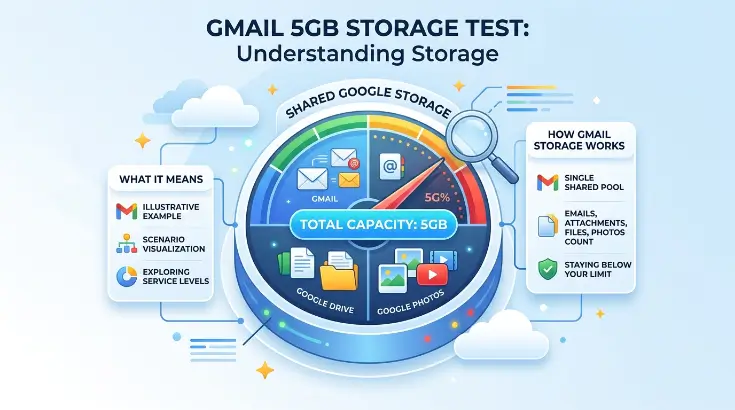
For years, Gmail users have enjoyed having a generous amount of free storage for email and other Google services. Recently, searches for google gmail 5gb storage test have increased because some users have encountered information suggesting that Google may be testing a 5GB storage limit.
That naturally raises an important question: Is Google actually reducing Gmail’s free storage from 15GB to 5GB?
The short answer is no—not for standard Google Accounts generally. Google’s current support documentation says that a Google Account includes up to 15GB of storage, shared between Gmail, Google Drive, and Google Photos. Reports about a 5GB message appear to relate to a limited test or account-specific prompt rather than a confirmed company-wide change.
Still, the subject is worth understanding because storage has become much more important than it was when Gmail first launched. Your emails, attachments, photos, videos, Drive files, and some other backups can all contribute to the same storage allowance.
This guide explains the Google Gmail 5GB storage test, the history of Gmail storage, what currently counts toward your Google storage, and what you can do if your account starts running low.
What Is the Google Gmail 5GB Storage Test?
The phrase google gmail 5gb storage test refers to reports that some users have encountered a 5GB storage-related message or experience connected with Gmail or their Google Account.
This has caused confusion because most standard Google Accounts currently have access to up to 15GB of shared storage. Google has not announced a general reduction from 15GB to 5GB for all users. A report published in 2026 described the 5GB message as a limited or account-specific test rather than a permanent change affecting every account.
That distinction is important.
Seeing a 5GB message does not automatically mean that every Gmail account now has only 5GB. Google frequently tests different features, messages, offers, and account experiences with selected users. A test shown to one group may never become a permanent feature.
Therefore, users should check the storage information displayed directly inside their own Google Account instead of relying only on screenshots or social media posts.
Gmail Does Not Normally Have a Separate 15GB Storage Bucket
One of the most common misunderstandings about Gmail storage is thinking that Gmail gets 15GB by itself.
That’s not how standard Google Account storage works today.
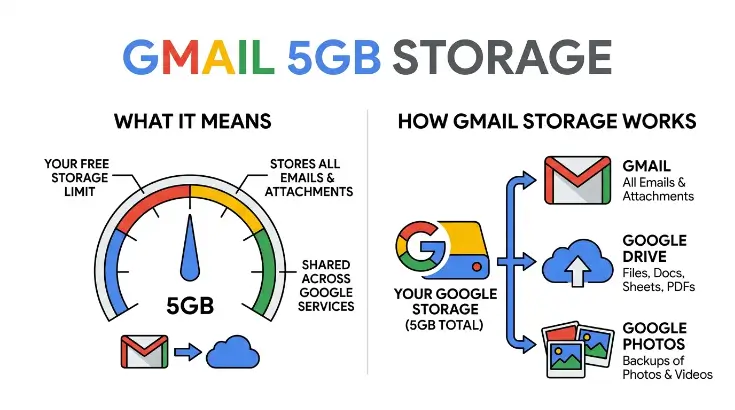
Google says that the included storage is shared across several services. Gmail, Google Drive, and Google Photos all use the same storage pool.
For example, imagine that your account has 15GB available. If your Gmail messages and attachments use 4GB, Google Drive uses 5GB, and Google Photos uses 3GB, you have already used 12GB.
That leaves only 3GB for everything else that counts toward your account storage.
This shared system is why someone can suddenly receive a storage warning even when their Gmail inbox does not look particularly large.
What Counts Toward Google Storage?
Understanding what consumes space is more useful than simply watching the storage percentage.
Google’s current storage documentation says that several types of data can count toward the quota. Gmail messages and attachments count, including content in Spam and Trash. Files stored in Google Drive can also consume space, as can qualifying photos and videos stored in Google Photos.
Other Google services and backups can also contribute depending on the type of account and data involved.
This means you should look at your overall Google Account storage, not only your Gmail inbox.
A person might delete hundreds of emails and still see very little improvement if most of their storage is actually being consumed by large videos in Google Photos or files in Drive.
Why the 5GB Number Is Causing Confusion
The 5GB figure sounds particularly concerning because Gmail’s storage history has always been closely watched by users.
When Gmail launched in 2004, Google offered 1GB of free storage, which was enormous compared with many competing email services at the time. Google itself later described the original service as providing 1GB of free storage when it launched on April 1, 2004.
The unusual storage allowance was one reason people initially thought the Gmail announcement might be an April Fools’ joke.
It wasn’t.
Gmail became a major part of Google’s product ecosystem, and its storage allowance increased repeatedly over the years.
That history helps explain why a possible 5GB limit attracts attention. A reduction would represent a major change from the storage arrangement most users have become accustomed to.
The History of Gmail Storage
Gmail’s storage story is one of the more interesting parts of the service’s history.
When Gmail entered testing in 2004, users received 1GB of storage. At the time, that was far more than many popular webmail services offered. Contemporary reports noted that Gmail’s 1GB allowance was dramatically larger than the storage available from major competitors.
Google increased the amount again as Gmail developed.
By 2005, Gmail users were receiving 2GB of storage. Google’s own historical material confirms that the service began with 1GB and later increased its allowance.
The service eventually moved through several larger storage levels. Gmail reached 10GB in 2012, and in 2013 Google introduced a shared 15GB storage pool covering Gmail, Google Drive, and Google+ Photos.
Today, that 15GB shared model remains important for standard Google Accounts.
Does the Google Gmail 5GB Storage Test Mean Storage Is Being Reduced?
Based on Google’s current support information, there is no general reduction of standard free Google Account storage from 15GB to 5GB.
Google’s official Gmail help page currently states that each Google Account includes up to 15GB of storage shared across Gmail, Google Drive, and Google Photos.
The reported 5GB test should therefore be viewed separately from the standard storage policy.
If you see a 5GB-related notice, don’t immediately assume that Google has permanently changed your account. Check the exact wording of the notification and open your Google Account storage page.
It’s also possible for different account types, promotions, tests, or regional experiences to display different information.
How to Check Your Gmail Storage
Checking your storage is simple and can tell you much more than a general internet discussion.
Open your Google Account and look at the storage section. You should be able to see how much space you have used and which Google services are responsible for that usage.
Pay attention to the breakdown.
If Gmail is responsible for most of the storage, cleaning old messages and attachments may help. If Drive is using most of the space, you should review large files. If Google Photos is responsible for the majority, large videos and other media may be the main reason.
This approach is much more effective than deleting random emails.
How to Free Up Gmail Storage
If your account is approaching its limit, start with the largest items.
Large attachments are often a good place to begin. Search Gmail for messages containing large files and decide whether you still need them.
Old promotional emails can also accumulate over many years. Although an individual marketing email may be tiny, thousands of messages can eventually take up meaningful space.
You can also review your Spam and Trash folders. Google notes that Gmail messages and attachments in those folders count toward storage.
Deleting unnecessary files from Google Drive can also make a major difference because Gmail and Drive share the same storage pool.
Why Attachments Matter
Text-based emails usually don’t consume much storage compared with large attachments.
A long conversation containing plain text might occupy very little space. A message containing multiple photographs, videos, presentations, or large documents can be considerably bigger.
If you have used the same Gmail account for many years, attachments can quietly become one of the biggest sources of storage consumption.
Instead of deleting useful conversations blindly, look for old messages with large attachments first.
That gives you a better chance of recovering significant space while keeping important correspondence.
What Happens When Your Google Storage Is Full?
Running out of storage can cause problems across multiple Google services.
Because Gmail, Drive, and Photos can share the same storage pool, reaching the limit may affect more than email.
This is another reason to avoid waiting until your account reaches 100% capacity.
If you regularly receive large attachments or use Google Photos to back up videos, your storage can increase much faster than someone who uses Gmail mainly for short text messages.
A quick storage check every few months can prevent unpleasant surprises.
Should You Delete Old Gmail Messages?
Not necessarily.
One of Gmail’s original advantages was the idea that users could keep old messages instead of constantly deleting them. Google’s early vision for Gmail was closely connected to generous storage and powerful search, allowing users to keep years of email and find messages when needed.
The better strategy is to delete messages that no longer have value.
Old receipts, newsletters, advertisements, duplicate notifications, and unnecessary attachments are usually better candidates than important personal or business conversations.
If a message could be useful later, consider keeping it.
Gmail’s Storage Has Changed More Than Once
The current discussion around the Google Gmail 5GB storage test also shows how much Gmail has changed since its beginning.
In 2004, having 1GB of free email storage was considered extraordinary. Gmail’s original storage offer was so unusual that many people believed the launch was an April Fools’ prank.
Today, cloud storage is used for far more than email.
People keep photographs, videos, work documents, school assignments, phone backups, and other files online. As a result, a shared 15GB allowance can disappear much faster than the original Gmail designers might have imagined.
Is 15GB Enough for Gmail?
For someone who primarily uses Gmail for ordinary email, 15GB can last a long time.
A person who receives mostly text messages and occasional small documents may use relatively little storage.
The situation changes when the same Google Account is used for large Drive files, high-resolution photos, videos, and backups.
This is why two people with identical 15GB allowances can have completely different experiences.
One user may have plenty of free space after several years, while another may reach the limit much sooner.
What Should Users Do About the 5GB Test?
The best approach is not to panic.
If you encounter information about the google gmail 5gb storage test, first check your own account. Look at the storage limit shown by Google and review how much space you have already used.
If your account still shows the standard 15GB allowance, there is no reason to assume that your storage has suddenly been reduced to 5GB.
You should also avoid trusting screenshots without context. A screenshot may come from a test account, an older version of a page, a special promotion, or a different type of Google account.
The most reliable information will come from Google’s own account and support pages.
Frequently Asked Questions
Is Gmail storage really changing to 5GB?
There is no general confirmation that standard Google Accounts are being reduced from 15GB to 5GB. Google’s current support documentation still lists up to 15GB shared across Gmail, Drive, and Photos.
What is the Google Gmail 5GB storage test?
It refers to reports of a 5GB storage-related experience seen by some users. Current reporting describes it as a limited or account-specific test rather than a confirmed universal storage change.
Does Google storage include Google Drive?
Yes. Standard Google Account storage is shared across Gmail, Google Drive, and Google Photos.
Do Gmail attachments use storage?
Yes. Gmail messages and attachments count toward your Google Account storage. Google also notes that Spam and Trash can count toward the quota.
How can I get more storage?
If you need more than the included storage, Google offers additional storage through Google One where available.
Final Thoughts
The google gmail 5gb storage test has attracted attention because Gmail users are understandably interested in how much free space they have available. However, the current evidence does not indicate a universal move from 15GB to 5GB for standard Google Accounts.
Google’s official documentation continues to state that a standard Google Account includes up to 15GB shared among Gmail, Google Drive, and Google Photos.
The most useful thing users can do is check their own storage rather than relying on rumors. If you’re getting close to the limit, remove unnecessary large attachments, old files, unwanted photos, and other data you no longer need.
Gmail has come a long way since its original 1GB storage offer in 2004. What once seemed like an enormous amount of space is now part of a much larger cloud storage system. As Google continues testing new features and account experiences, storage messages may change for some users.




[…] means policymakers must continue working on recurring revenue and spending controls instead of depending too heavily on temporary financial […]
[…] the most common problems is that the code has expired. Promotional codes are often temporary, which means a code that worked several days or weeks ago may no longer be […]
[…] a code does not always mean it will work. There are several reasons a redemption attempt can […]
[…] Google Flow works well for cinematic scenes, storytelling, visual experiments, and projects where you want more than a simple animation. […]